Arugula

Every agent, every machine, one view.

Claude Code, Codex and shells on the machines you've connected, in one view. Answer them from your phone. The workspace comes back after a reboot.

Download for macOSApple silicon · free

Or paste this in Terminal. It installs the app and opens it.

curl -fsSL https://arugula.io/install.sh | sh

Intel Mac: .dmg · Zipped app: Apple silicon, Intel · Linux: AppImage · .deb · Windows: installer · servers, without a screen

Open source clients and daemon. Hosted control is free during the beta; connect a machine to use it.

swarm · browser and phone recorded

Open source, on your machines. Connections to your machines are end-to-end encrypted; the optional relay serves the web client, so you trust that. What control can and can't see · Limitations

Swarm / arugula

0panes
6machines
0busy
0need you

Illustration: generated panes, activity and names.

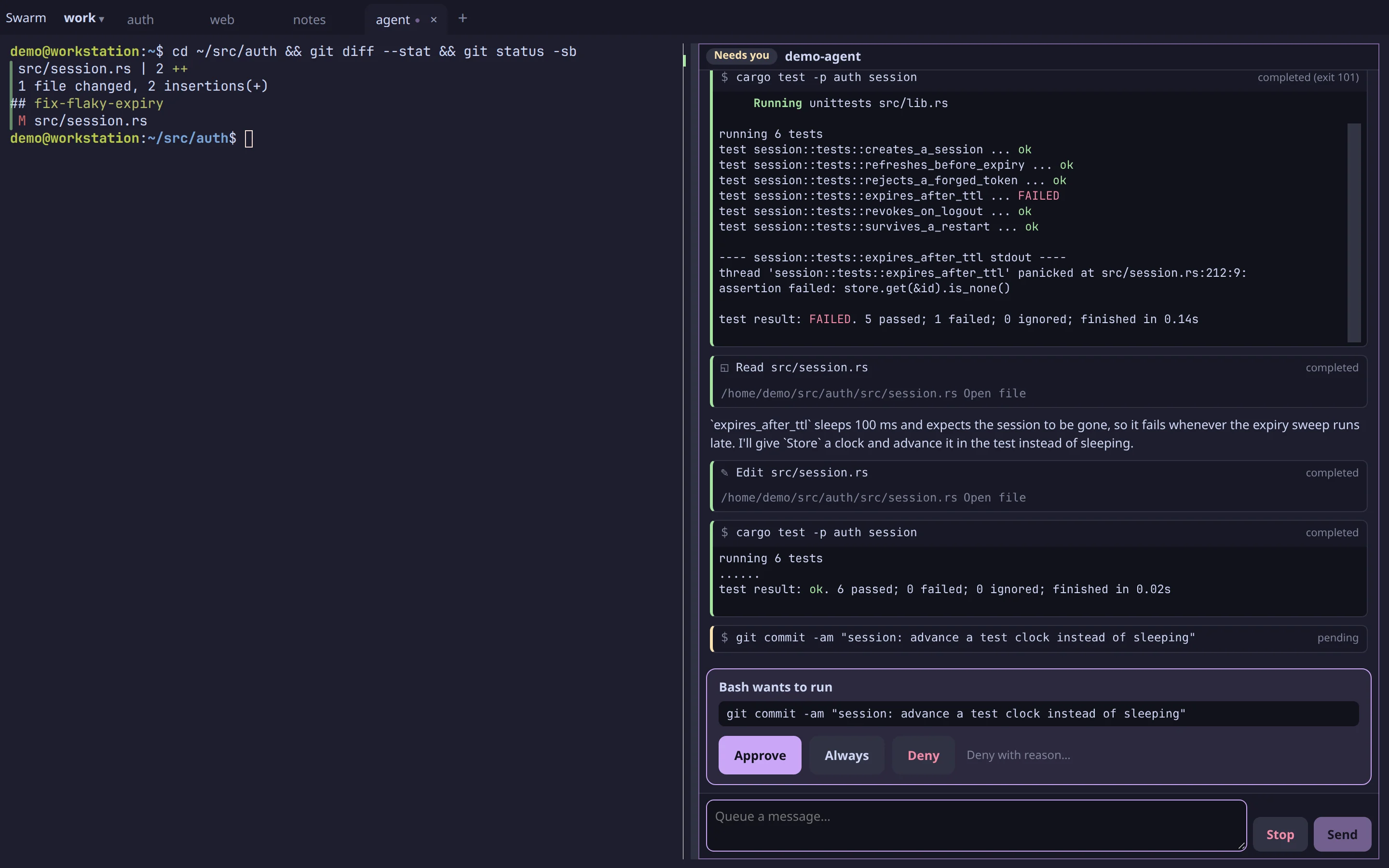
%62 agent · workstation · ~/src/authclaude code · open
An agent working through a failing test beside a shell, with its commands and results visible

Every session, one view.

Every Arugula pane on the machines you've connected, grouped by project, machine, kind or person.

See who needs input.

Detected requests for input lift out to one rail. Whoever answers is named on the card.

Leave sessions open.

Start a task with Claude Code or Codex and come back to it later. Zoom into a project and every session is still there, with its output.

Open the one you need.

Click a tile and you’re in the session: the agent, its commands and their results, live.

linux box · laptop · phone · 90 seconds

Watch it run.

arugula · recorded captions · no sound

phone · laptop · 2 need you

Answer from your phone.

Detected requests for input land on one rail. See which agents are waiting and answer from your laptop or phone: large buttons for approvals and choices, or type the next instruction.

Screen detection flags a waiting Claude Code or Codex pane. Claude Code's hooks and agent blocks turn requests into cards. Other agents are detected too; their hooks or the bell say when they need you (limitations).

Turn on notifications and a push opens the card on your phone. On an iPhone that needs HTTPS, the page on your Home Screen, and notifications on (how).
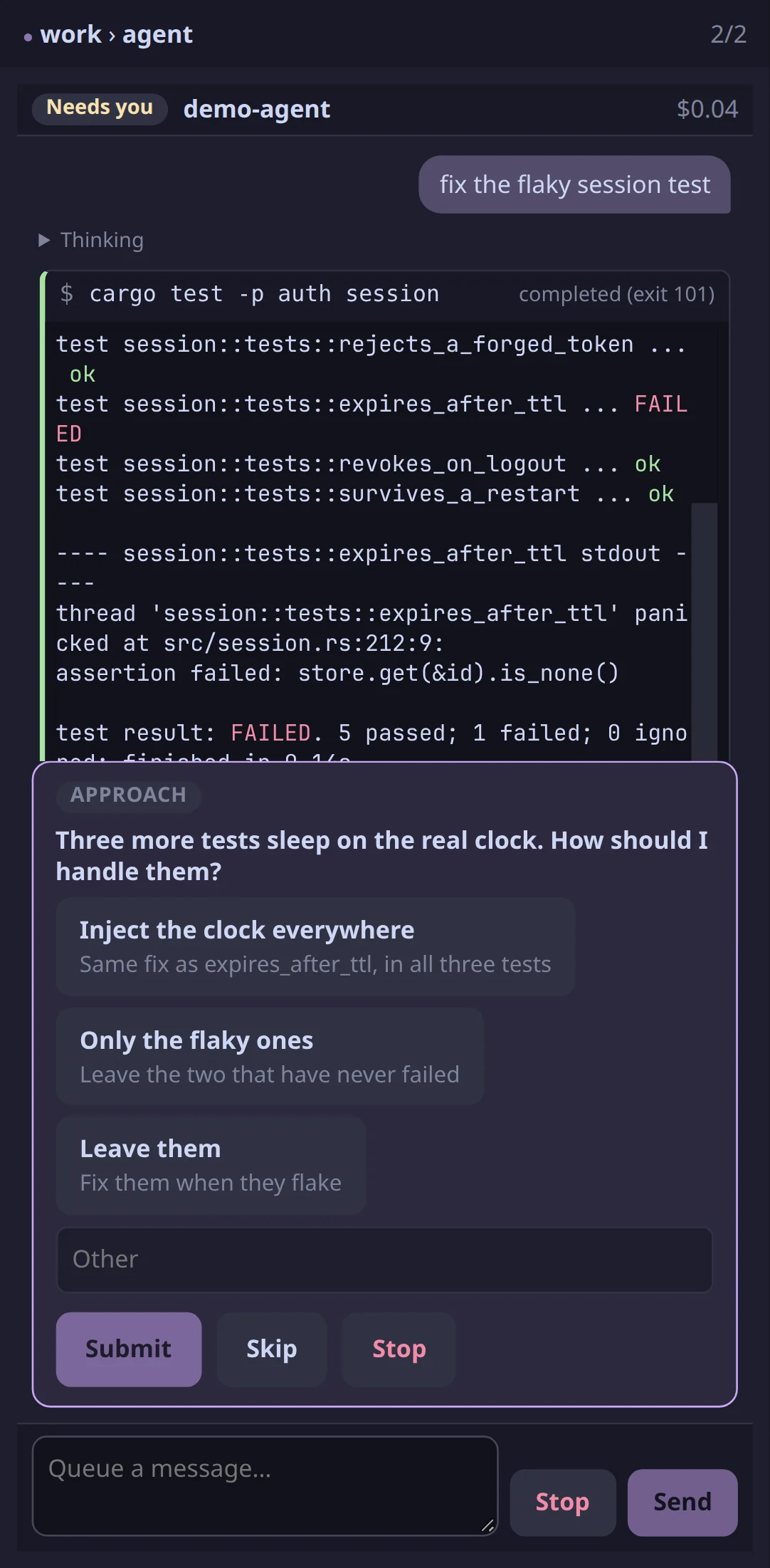
%62 agent needs you
An agent’s question on a phone, with three approaches to choose from
%63 test ok
A terminal workspace open on a phone

workstation · restored · scrollback kept

Reboot. The workspace comes back.

Close the window or disconnect: programs keep running on the host.

Restart or update the daemon: programs keep running.

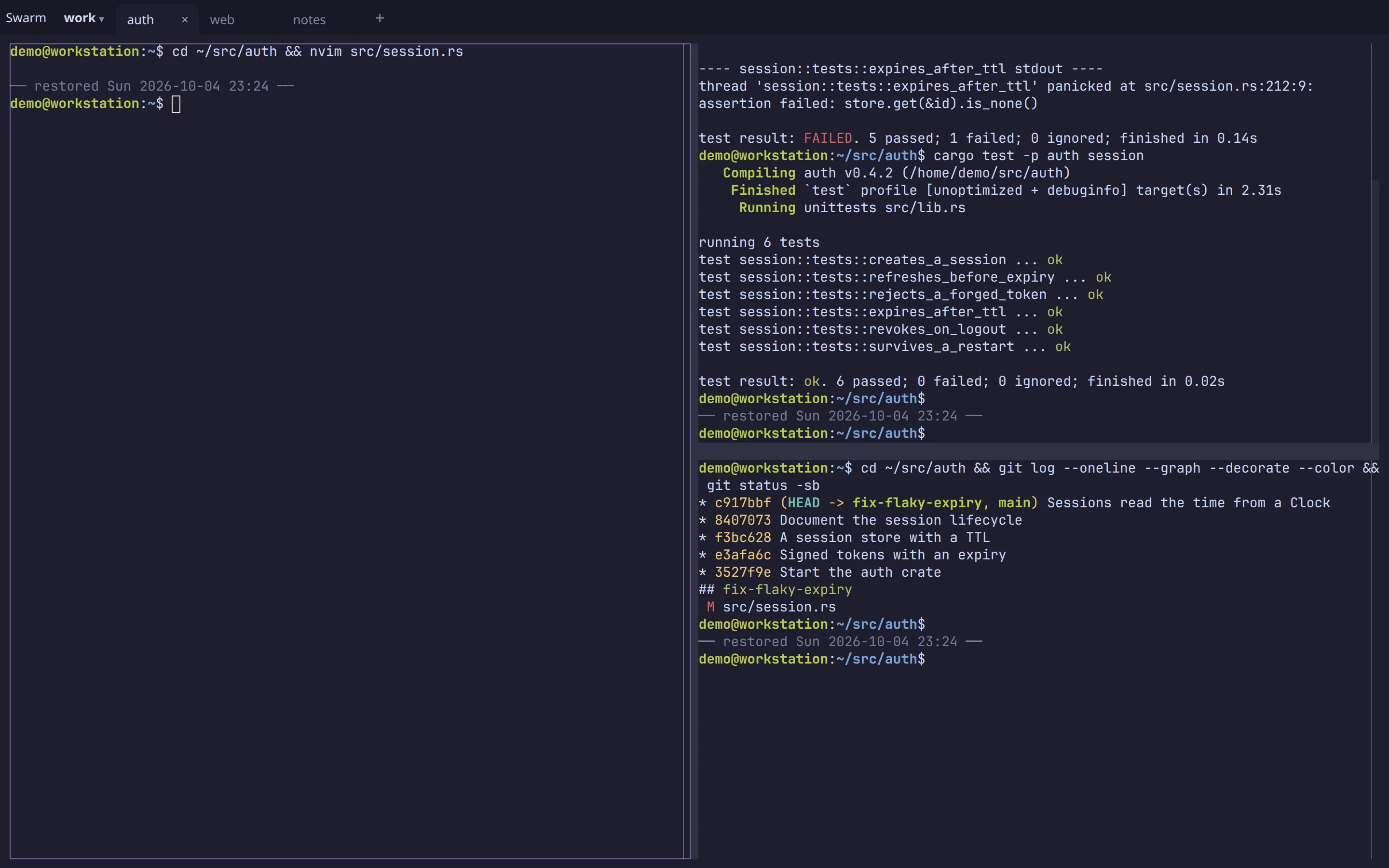
Reboot: processes stop. Arugula restores the layout, working directories and scrollback, then restarts each pane per its setting: a shell where it was (the default), re-run its command (asking first unless you choose otherwise), or resume Claude Code's conversation, the default for a Claude pane.

%41 shell · workstation · ~/src/authrestored
A workspace after a reboot: each pane back in its directory with its earlier output, marked restored, above a fresh prompt

agent · panes · needs you

Agents do the work. You decide.

Through Arugula's MCP server, Claude Code, Codex or any MCP client can start dev servers, tests and builds in panes you can watch. They can file issues and, with your permission, post updates.

shell · ~/src/auth one time
$ arugula setup
✓ Claude Code's agent adapter, at the pinned version
✓ MCP server arugula added to Claude Code
$ arugula hooks install
✓ questions      → cards beside the pane
✓ permissions    → anyone you allow can answer
✓ follow-ups     → waiting when it stops
$ claude 

diff · port · editor · conversation

Not just terminals.

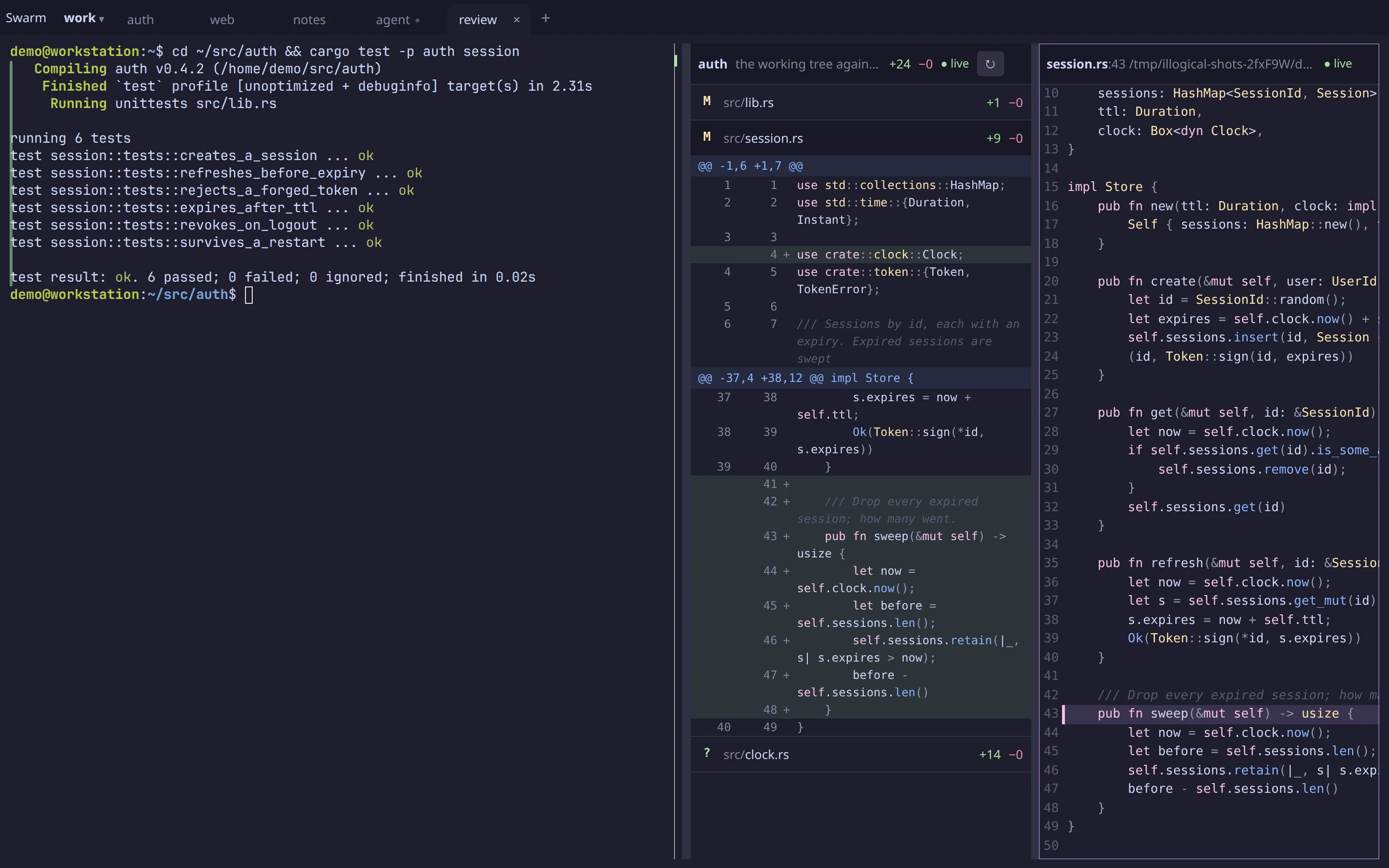
A terminal is one kind of block. The things you'd switch windows for open beside the pane they're about, in the same tabs and splits, on the same machine, and they come back after a restart. Changes and conversations work as soon as it's installed; dev servers and VS Code are opt-in, because each needs a web origin of its own (how to turn them on).

changes · ~/src/auth read-only
A passing test run beside a diff block listing the changed files with their hunks, and a file block open at the new sweep function

The live diff

Changes opens the live diff of the pane's repository: each file with its +/−, its hunks a tap away. Tap a line for the file, marked there. Both follow the edits as they land, and nothing in them can write, so checking the work from your phone is safe.

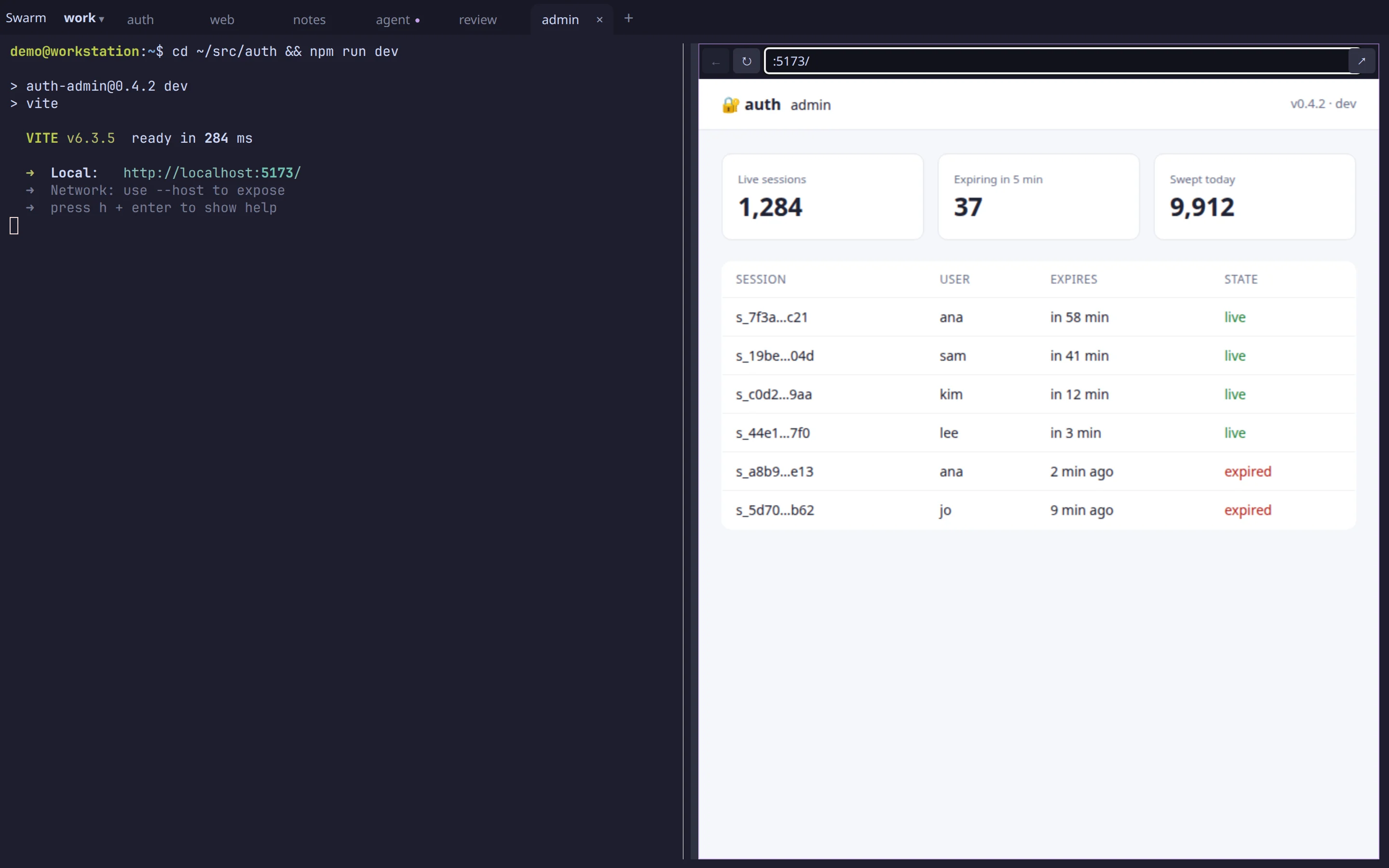
:5173 · npm run dev own origin
npm run dev in a terminal, and the app it serves in a browser block beside it

Your dev server, beside it opt-in

npm run dev in a pane, then open its port: the app sits next to the terminal, hot reload and all. Each block is its own origin, so the page can't reach Arugula. When the server dies the block says so, and the page comes back with it. One daemon flag turns it on for the browser on that machine; from your phone, it also needs a domain of yours. It's shown by a device that can reach the machine directly; not relayed through control.

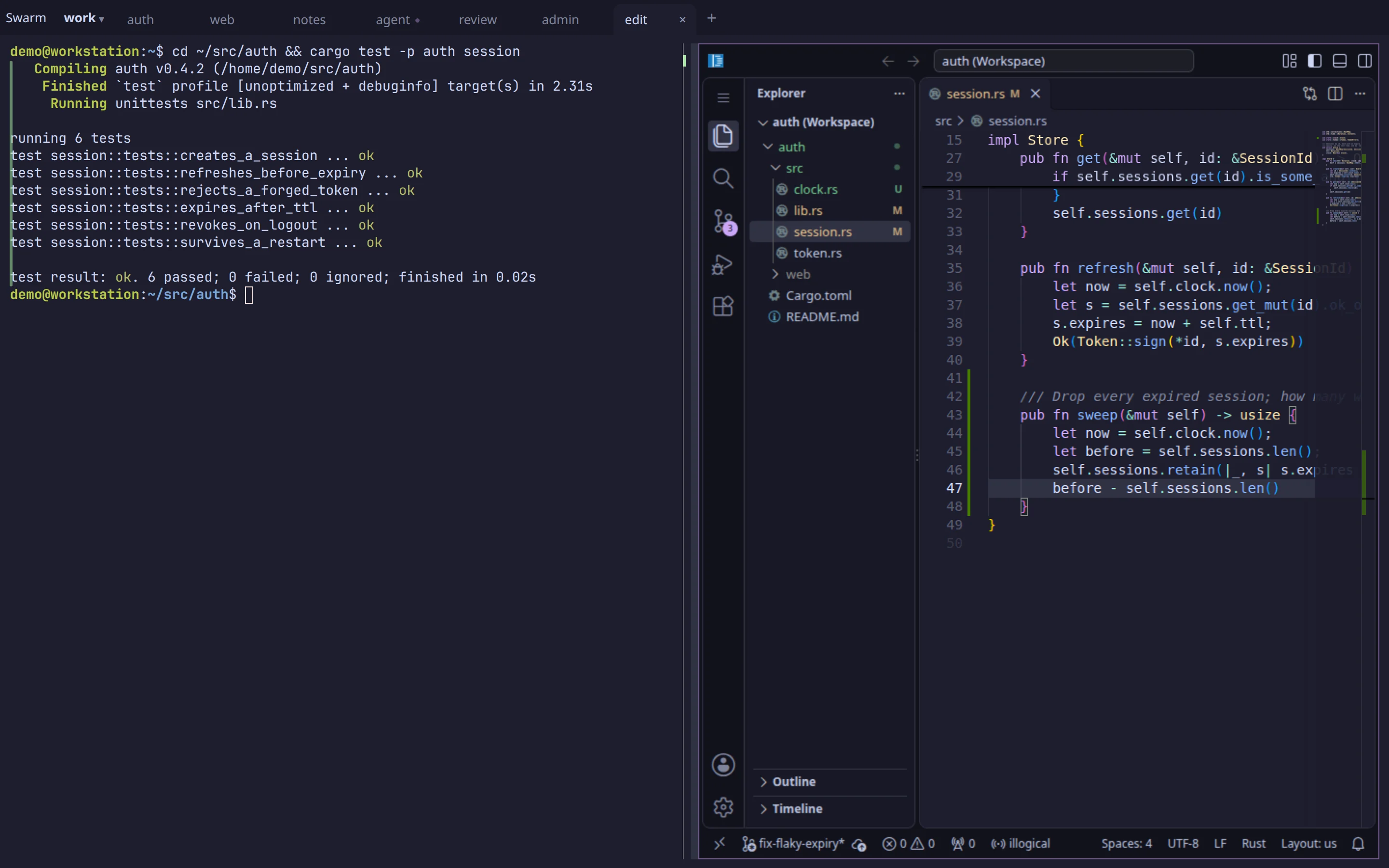
vs code · session.rs:212 on workstation
A passing test run beside VS Code, open on the same repository at the changed function

VS Code where the pane runs opt-in

Open in editor starts VS Code on the pane's machine, at the file and line, with your settings and extensions kept, and it sleeps when nobody has it open. It's shown like a dev server, so it's turned on the same way: by a device that can reach the machine directly; not relayed through control.

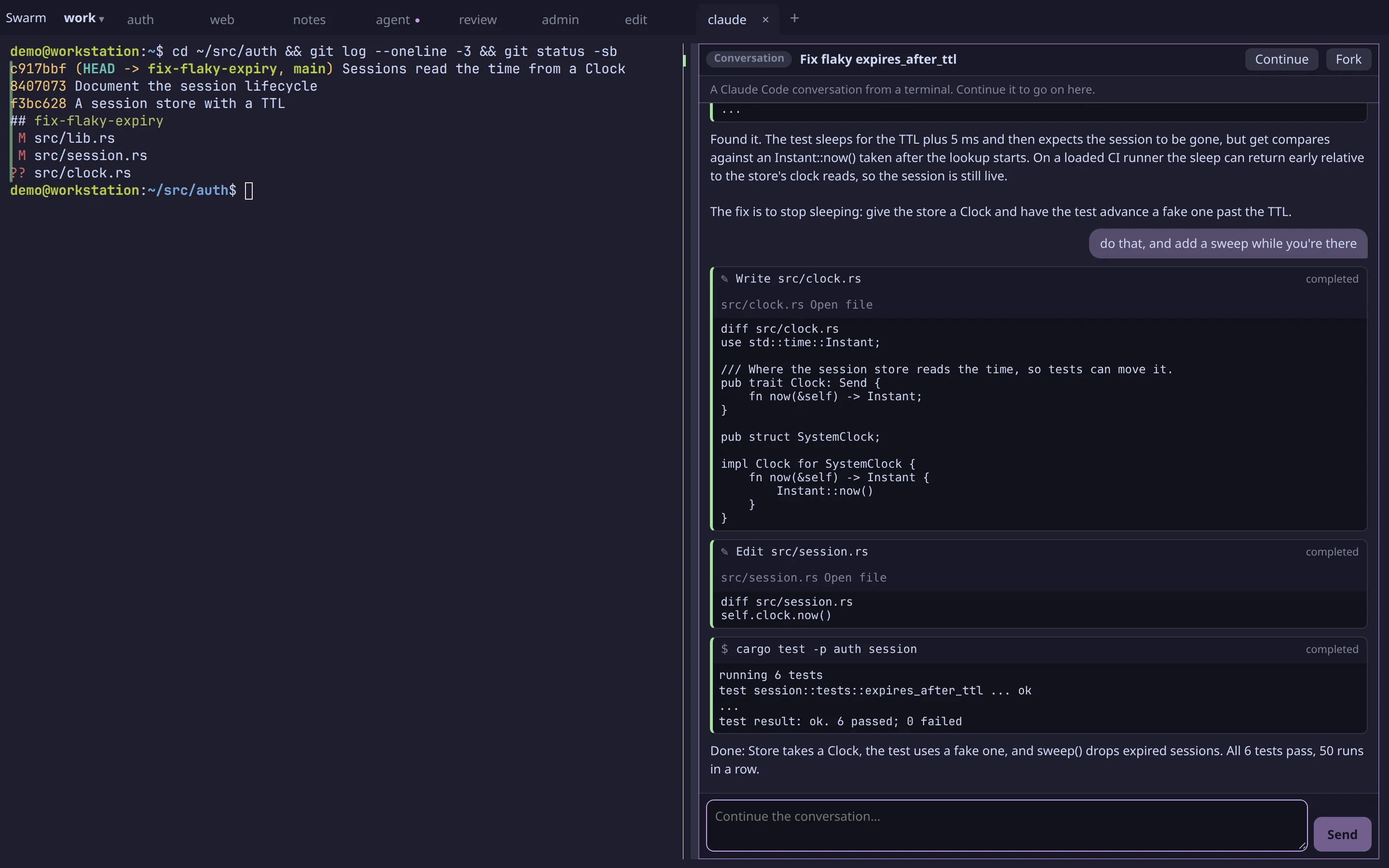
conversation · claude code continue · fork
A Claude Code session from a terminal opened as a block: its prompts, replies and tool calls, with Continue and Fork

Claude Code conversations

Any Claude Code session on the machine, from a terminal or the desktop app, opens as a block: prompts, replies, every tool call and its output. Follow one from your phone as it runs, then Continue it right there, with your settings and skills, or Fork it if it's still open somewhere else.

And more: web pages (arugula open example.com), panes from your other machines in this layout, drawn straight from their host, and your own VS Code, Cursor or nvim as tiles in the swarm, with the debugger's stops as cards. Every kind shares the layout, the arugula CLI and the rail of what needs you.

your machines · platform · cloud workspaces

Know what Arugula can read.

Your machines. Terminals, files and agents stay on your own machines or servers you manage. Connections to them are end-to-end encrypted; control relays them and can't read them. It serves the web client, so you trust that client not to read or alter your session.
The platform. Projects, chat, issues, runs and deploys are stored by Arugula in plaintext so they work while your machines sleep. The privacy page lists exactly what it holds.
Cloud workspaces. Hosted machines Arugula runs for a project. The operator can read them, and the page says so.

After your first device, a new one gets in only when one you already have approves it, and a deploy needs an owner's passkey.

arugula control · teams · roles · presence

When your team joins.

With Arugula control, authorized teammates can share a session or a whole machine, with roles and presence (teams, sharing): anyone allowed can answer an agent's card, and everyone sees who did. Your team talks in channels and DMs, with threads on the work itself. Open projects in your browser or the desktop app.

team-box · shared with sam

Share the session.

Share a session to pair with a teammate, answer their agent or help with a stuck task. You choose who can watch and who can type.

work · team-box · tabs and splitsshared with sam
A terminal workspace with tabs and splits that can be shared with a teammate

chat · issues · repos · workspaces · runs · deploys

One project.

Your project holds the work: issues, linked repos, Cloud workspaces, runs and deploys.

Chat

Talk in team channels, DMs and threads on the work.

Issues

File issues, add task lists and let agents update them.

GitHub

Link your repo to bring its PRs and issues into the project.

Cloud workspaces

Open a hosted machine for your project.

Runs

Start CI runs and watch their live state.

Deploys

Review a plan and sign it with your passkey.

team chat · object thread · live cards

Talk beside the work.

Open team chat beside your terminals. Talk in channels and DMs, or in a thread on an issue, run, deploy or PR. Links to Arugula work become live cards.

Agents can read and post only when you grant access, within your own reach. Each says whose it is and where it runs, like “kim’s agent on workstation”. Chat is stored in plaintext so it works while your machines sleep.

#general · acme 3 online
Team chat in #general: a pull request and a deploy waiting for approval as live cards, a code block with reactions, a message from kim's agent on workstation reporting a test run, and a four-reply thread open beside the room

acme · 6 open · linked to acme/api

Issues, native or from GitHub.

File numbered issues in your project, with task lists, comments and @mentions. Pin an issue beside a pane. Your agents can read and update it over MCP.

Link a GitHub repo to bring its issues and PRs into the project and see what needs you in an inbox. Metadata is mirrored; bodies are read on demand. Every read checks your GitHub access.

issues · acme 6 open
A project's open issues, numbered #2 to #7, with labels and assignees, and a choice of whether new issues live on Arugula or on GitHub

hosted machine · terminal · preview

A machine for your project.

Open a hosted machine with terminals, agent blocks and a dev-server preview. Your team can watch setup in a pane. Previews are members-only unless you mark a port public.

It pauses between agent turns when idle, keeping memory and disk, and wakes when someone opens it. Your inference keys never enter the box. The UI says “Hosted: the operator can read”.

acme-api · hosted relayed
A hosted workspace on control's page: the acme status page in a preview block, a terminal with passing tests and the dev server running, and a Claude Code agent block that just added the 30-day uptime column the preview shows

run · deploy plan · phone approval

Run. Review. Deploy.

Start CI runs yourself, on a schedule or from GitHub events. Watch live state; logs and artifacts stay for 30 days.

Agents start runs and plan deploys too. A deploy goes out only when an owner signs its plan. Agents never approve.

Review the deploy plan before an owner signs it with a passkey, using Touch ID or a phone. Each deploy gets a fresh box, deleted afterward.

Arugula's own releases ship through Arugula's deploys.

runs · acme 1 running
The runs page: six runs of ci and nightly, one running, one failed and four passed, and the run specs below with a GitHub event rule and a nightly schedule
production sign
A deploy to production on a phone: the exact operation and its hash, with Back, Deny and Approve with passkey

macos · linux · windows · free

Get Arugula.

Download the desktop app for macOS, Linux or Windows, or open app.arugula.io in any browser. Free and open source, under MIT or Apache-2.0.

Download for macOSApple silicon · freeor, from a terminal
curl -fsSL https://arugula.io/install.sh | sh

Intel Mac: .dmg · Zipped app: Apple silicon, Intel · Linux: AppImage, .deb · Windows: installer (not signed yet: SmartScreen asks you to choose More info, then Run anyway) · Homebrew, PowerShell, servers and building from source